Recently I searched for a client's homepage. Google described it like this.
"Slide 1. Marine Engineering & Calibration Solutions..."
Slide 1.
That was the first thing a potential customer saw about the business in search results.
The homepage used a three slide hero carousel. Nice photos. Smooth transitions. It looked good. But the carousel's navigation labels sat in the page code as ordinary text. Slide 1. Slide 2. Slide 3. Google read them like any other content on the page. And one of them became the opening line of the company's search description.
The designer did nothing wrong by design standards. The carousel worked. It looked professional. There was simply no reason for a designer to know what Google reads and what it ignores.
That is the whole problem in one small example.
I work on both sides of this. I build websites and I do SEO on them. And over the past few years I keep running into the same thing. A business gets a beautiful website. It launches. Months later someone comes in to do SEO. And the audit finds problems that cannot be fixed with a title tag or a meta description, because they were built into the site long before anyone thought about search.
This article walks through one real project. A Singapore based marine calibration company. I will show you seven findings from that audit, what each one cost, and what a short conversation would have prevented.
Here is the thread running through all of them. Not one was a writing problem. Every single one came from a decision made by someone who was never asked an SEO question, because at that point in the project nobody was responsible for asking.
The workflow that creates this
Most website projects run in a straight line.
Business idea
   ↓
Web design
   ↓
Development
   ↓
Launch
   ↓
(six months later)
   ↓
SEO audit
   ↓
Problems
   ↓
Redesign
The SEO person arrives last. By then the structure is set, the templates are built, the URLs are live, and the client has already paid for the site once.
Here is what the order should look like.
Business goals
   ↓
Audience and search research
   ↓
Content and SEO strategy
   ↓
Information architecture
   ↓
Wireframes
   ↓
UI design
   ↓
Development
   ↓
Technical SEO QA
   ↓
Launch
The second version costs a few extra hours at the start. The first one costs a rebuild.
Who should be in the room before the first mockup
This is not an argument that SEO people should lead website projects. They should not. Neither should designers or developers alone.
The point is that three sets of questions need answers before anyone opens Figma.
The SEO and marketing side needs to know what people actually search for, which page answers which query, what content each page has to carry, and how pages should link to each other.
The design side needs to work out how information ranks visually, what the user journey looks like, where conversions happen, and what the hierarchy on screen should be.
The development side needs to know what the CMS has to support, whether the markup is semantic, whether the site will be fast, and whether search engines can crawl it.
None of these questions is hard. They just need to be asked while things are still cheap to change.
The real cost of skipping this is not that someone makes a bad decision. It is that a reasonable decision by one team quietly becomes another team's problem six months later.
Seven findings from the audit
A note on timing before we start. Everything described below is what I found when the audit began. Where we have already fixed something, or where a problem is still live as I write this, I say so.
1. Six services became anchor links instead of pages
The company offers six distinct services. On the website, all six lived on one page as anchor sections.
/services/#ship-fixed-portable
/services/#ship-navigation-control
Google generally ignores everything after the hash when it indexes a page. A fragment is a position on a page, not a page. So when someone searched for gas detector calibration in Singapore, or ODME calibration in Singapore, the site had nothing to show. Not a weak page. Not a thin page. No page at all.
Here is what that decision cost. At wireframe stage it would have been one conversation about how many pages we needed. After launch it meant six new pages, redirect mapping, internal link updates, and then months of waiting to build visibility again.
There is a principle underneath this one. Take just four of the six services. Portable equipment calibration, fixed system calibration, gas detector service and ODME calibration are four different searches a ship operator would make. They are not four bullet points under one heading.
Website architecture should follow how the customer thinks about the service. Not how the company organises its internal departments.
2. Two parallel service structures, one completely invisible
When I pulled the sitemap, I found two full sets of service pages.
The first one lived at /services/ with six anchor sections. That was the one in the menu, the one actually being used. The second lived at /our-services/ with seven separate pages. It was not in the menu, it had been dormant since September 2025, it had no images, and it was invisible in Google.
Notice that the counts do not even match. Six sections in one structure, seven pages in the other. That mismatch is part of how I knew the second set was almost certainly left over from a theme demo import rather than a deliberate decision.
Nobody had noticed it for about a year.
This kind of thing rarely triggers an error. Nothing breaks. There is no warning in Search Console. It just sits there, an entire second version of your service offering that nobody maintains and nobody links to, waiting to confuse anyone who eventually finds it.
3. The carousel put "Slide 1" into Google's results
Back to where we started.
Three slides. Each one marked up with its own H1. So the homepage had three H1 tags instead of one.
And the carousel controls were plain text in the page code, so Google indexed them as content. That is how "Slide 1" ended up as the first words in the search snippet.
The conversation that would have prevented this takes about ninety seconds at wireframe stage. Which slide carries the H1. Are the carousel controls marked up as controls or as text.
That is it. Ninety seconds.
4. Placeholder content shipped live and stayed there
This one still surprises me. Here is what was sitting on the live homepage when I started.
Three Lorem Ipsum testimonials, credited to "Dummy Name, Designation."
Statistics counters showing Ship 0, Destination 0, Satisfied 0, Skippers 0.
A "Shop All Products" button linking to <a href="<>">. An empty link.
A WhatsApp icon loading from a completely different website. It belonged to another one of the developer's clients, a pest control company.
None of this is a content problem. Nobody failed to write good copy. These are handoff failures. The design phase produced placeholders and nobody was assigned the job of replacing them before launch.
Worth adding for honesty. Some of these are still live as I write this, on a page that now ranks third in Singapore for its main query. Which tells you something about how much room there was to improve.
5. Copy written to fill a box, not to answer a question
The main About section on the homepage had a specific shape to it.
The same two sentences repeated four times.
The word "calibration" appeared zero times.
The word "Singapore" appeared zero times.
The page title was "Marine Calibration Services Singapore."
Here is why this happens so often. The designer builds a container. Later someone is asked to fill it. So the text gets written to the size of the box instead of to the shape of the question a customer is actually asking.
Content informed design flips that around. You decide what the page has to answer first. Then you design the container that holds the answer.
6. The firewall was blocking Google
This is the finding I did not expect.
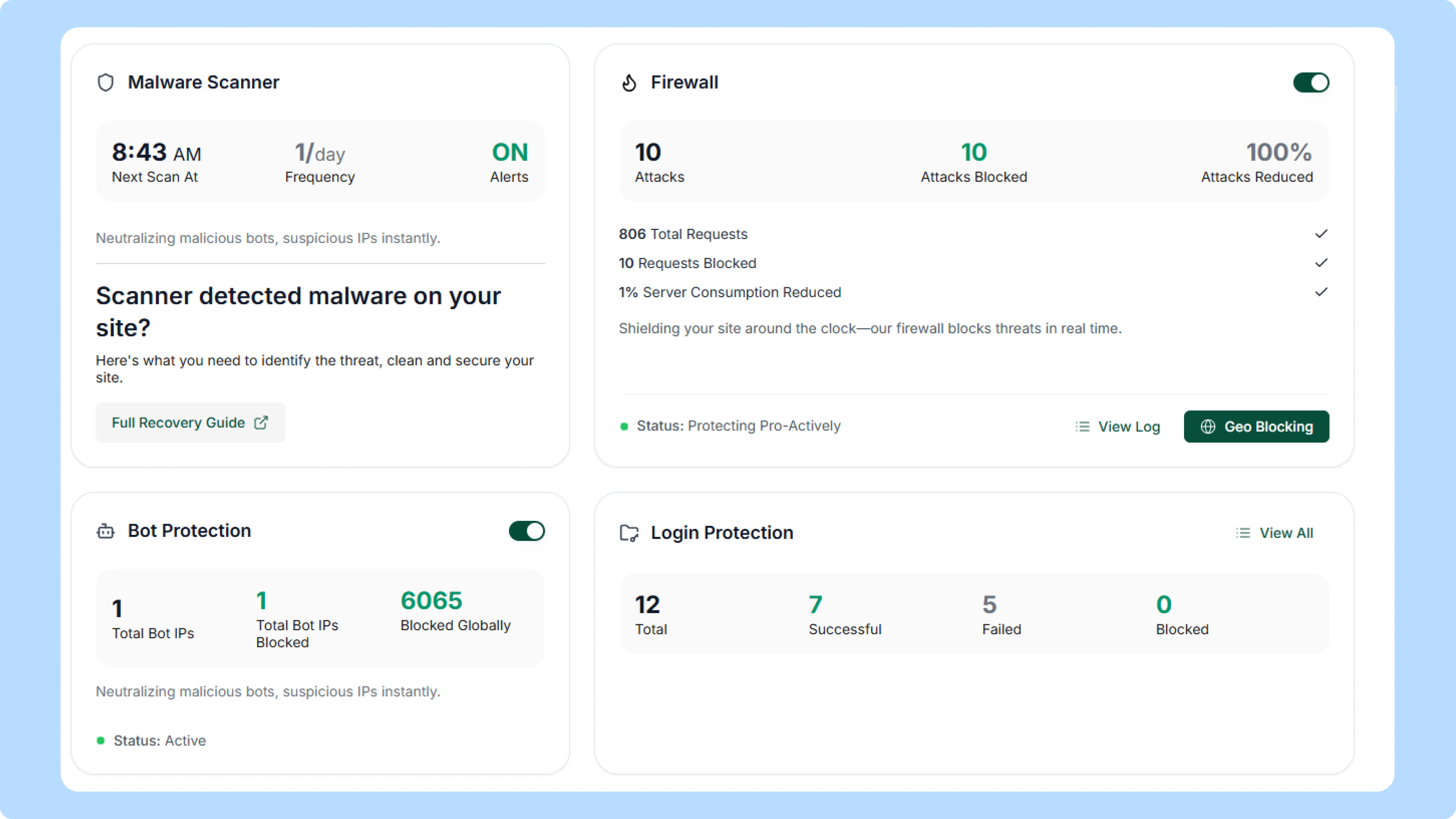
Firewall logs over the audit period showed 9,478 total requests, of which 4,450 were blocked. Among the blocked requests were Googlebot hits on robots.txt, the sitemap index, the homepage and product pages.
Blocking 4,450 requests is not the problem. That number is normal for any site with a firewall running. Most of what gets blocked is scrapers, bots probing for vulnerabilities and general junk. That is the firewall doing its job.
The problem was who else was in that list.
Googlebot was being blocked. And the robots.txt file was blocked three times in a single day. That file is the first thing a crawler reads before it does anything else on your site.
Nobody made a bad decision here either. Somebody installed sensible security. It just never occurred to anyone to ask how the firewall rules would interact with search crawlers, because crawling was not anybody's job at that point in the project.
While I was in there I found a separate problem with the sitemap. It listed 100 products. The site actually had 217. The blog sitemap was switched off entirely. That is a sitemap configuration issue rather than a firewall one, but it points the same direction. Nobody had checked whether search engines could actually see the site.
7. The architecture told Google the wrong story
Two numbers explain this one. The site had 217 product pages. It had one service page.
Google reads that ratio. And it draws a conclusion.
The top click driving query in Search Console was this.
"marine supply store in singapore"
The company is a calibration services provider. But Google had classified it as a shop, because 217 out of 218 commercial pages were products.
You can write "we are a leading marine calibration services provider" in your hero section as many times as you want. If your structure says shop, search engines hear shop. Structure speaks louder than copy.
What the numbers actually looked like
Over a three month window at the start of the engagement, the site pulled 2,410 impressions and 81 clicks. That works out to a 3.4% click through rate, which is not terrible on its own. The average position was 34.1. Traffic split fairly evenly between Singapore at 29% and Malaysia at 28%. And the single biggest source of clicks was the brand name itself.
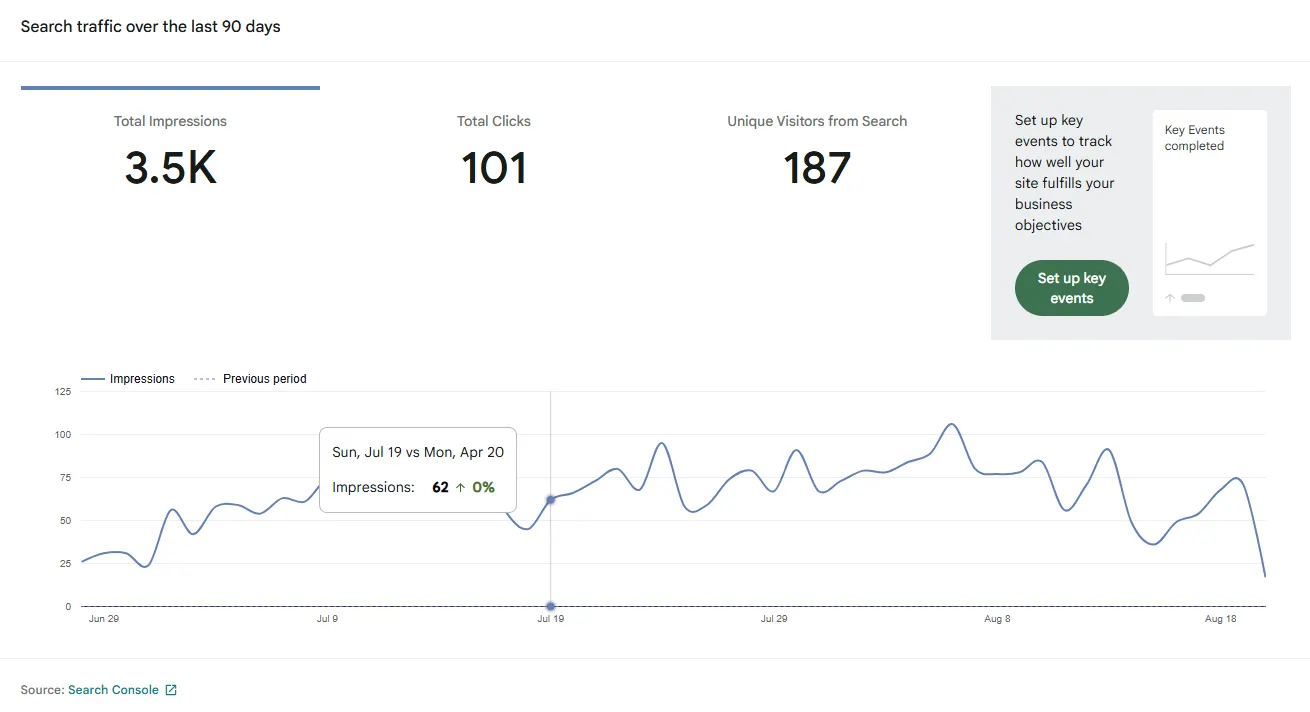
Average position 34 means page four on average. Almost nobody goes to page four.
One clarification, because these two numbers appear in the same article. Average position 34.1 is the mean across every query the site appeared for, including hundreds it had no business appearing for. The third position ranking I mentioned earlier is one specific query on one specific page. Both are true at the same time. A site can have one strong page and a very weak average.
But the number that matters most here is the top query. It was the brand name.
That means people who already knew the company could find it. Everyone else could not. The site had no architectural surface area for people searching by problem instead of by name.
And you cannot write your way out of that after launch. There has to be a page for the query to land on.
Design is not the villain here
If I only told you the failures, this article would be dishonest. Two things pushed against my own argument on this project.
Good content can outrun weak structure.
We added a detailed FAQ section to the homepage. Real answers, with actual references to SOLAS, MARPOL, MEPC.107(49) and SIRE 2.0. Specific standards that a ship operator would recognise.
That page moved to third position in Singapore. It also got cited as a source inside Google's AI Overview.
The structure was still imperfect when that happened. Several of the problems above were still live. The substance moved it anyway.
Some design decisions were genuinely right.
The hero image showed a real engineer with a gas detector aboard a vessel. Not a stock photo. Most competitors in this space use generic stock imagery, and a real photo of real work does more for trust than any of them.
The designer's instincts about what would build credibility with a maritime audience were good. He just was not asked about the things he had no way of knowing.
So here is the honest conclusion.
The design was not bad. The design and the SEO were done in separate rooms.
What about AI search
I want to be careful here, because there is a lot of noise about this right now.
There is no secret AI structure you can build into a site.
But notice what actually worked on this project. The FAQ content got picked up by Google's AI Overview. And the reasons it worked are not mysterious. The answers were specific. Each one was self contained. Real standards were named directly. The headings made it clear what each section covered.
Those are the same properties that make content easy for a traditional search engine to understand. They are just fundamentals.
So yes, clear architecture and useful content give you a stronger foundation for both traditional search and AI powered search.
But neither guarantees rankings. And neither guarantees a citation in an AI answer. The AI Overview result on this project was an outcome. It was not a promise, and I would not sell it as one.
The SEO first website framework
Here is the sequence I use now.
Discover. Business goals, audience, competitors, search demand.
Plan. Search intent, keyword to page mapping, content strategy.
Structure. Information architecture, URLs, navigation, internal linking.
Design. Wireframes, content first layouts, UX, conversion paths.
Develop. Semantic markup, performance, CMS setup, structured data.
Validate. Crawlability, indexability, Core Web Vitals, metadata, and firewall access for bots.
Grow. Search Console monitoring, content expansion, measurement.
That last item under Validate came directly from this project. I had never thought to check firewall rules against Googlebot before. Now it is on every checklist I run.
A pre launch checklist
Strategy
Business goals and primary conversions defined
Target audience and their actual questions documented
Search intent researched for each service
Architecture
Every distinct service has its own page, not an anchor
Page inventory mapped against target queries
URL structure decided and written down
No duplicate or leftover page structures
Internal linking planned before the build starts
Content
Content requirements defined before layout
Every placeholder replaced. Testimonials, counters, links, icons
Trust signals identified, such as certifications and compliance
Design
One H1 per page. Check carousels and sliders specifically
Carousel and slider labels not exposed as body text
Layouts leave room for content to grow
Important information not locked inside images
Development
Semantic HTML with crawlable links
Sitemap complete and matching the real page count
robots.txt reachable
Firewall and WAF rules tested against Googlebot
No assets loading from unrelated domains
QA
Crawl test and index coverage check
Search Console verified, sitemap submitted
Metadata and heading audit
Broken and empty links checked
Look back at the seven findings.
The "Slide 1" snippet was not an SEO failure. It was a design decision that nobody asked an SEO question about.
The blocked crawler was not a security mistake. It was a security decision that nobody asked a crawling question about.
The 217 to 1 product to service ratio was not a content strategy failure. Nobody had a content strategy when the structure was set.
In every case, the person making the decision did their job properly. They just did it without the information that would have changed the decision. And nobody in the room was responsible for supplying it.
That is what happens when SEO shows up last.
So do not design the website first and figure out optimisation later. Decide what the site needs to communicate, how people will find it, and how machines will understand it. Then design around that.
It is a few extra hours at the start. It saves you a rebuild.
At Appdeel we handle design, development and SEO together, which is mostly why we found these problems in the first place. If you are planning a new site or a redesign and want the architecture sorted before the visuals, get in touch.
